Sensitivity Analysis
Create automatically sorted sensitivity charts to rank the main drivers of output.
Input Parameters/Data
Input Variable(s): Input driver(s) of the model. For each item, add Name and Reference (cell reference of its value).
Output Variable: Output of interest (e.g. Valuation, Profit, NPV, IRR etc.). Add Name and Reference.
Output Settings - Sensitivity %: Select % change in input variable used for the sensitivity analysis.
Output Settings - Scenarios: Toggle to run scenario analysis for each input variable.
Notes
Input Cell references can be any cell in Excel (i.e. including cells with formulas).
The output defaults to the classic Tornado Chart (i.e. range of output values). You can toggle it to show percentage change of output.
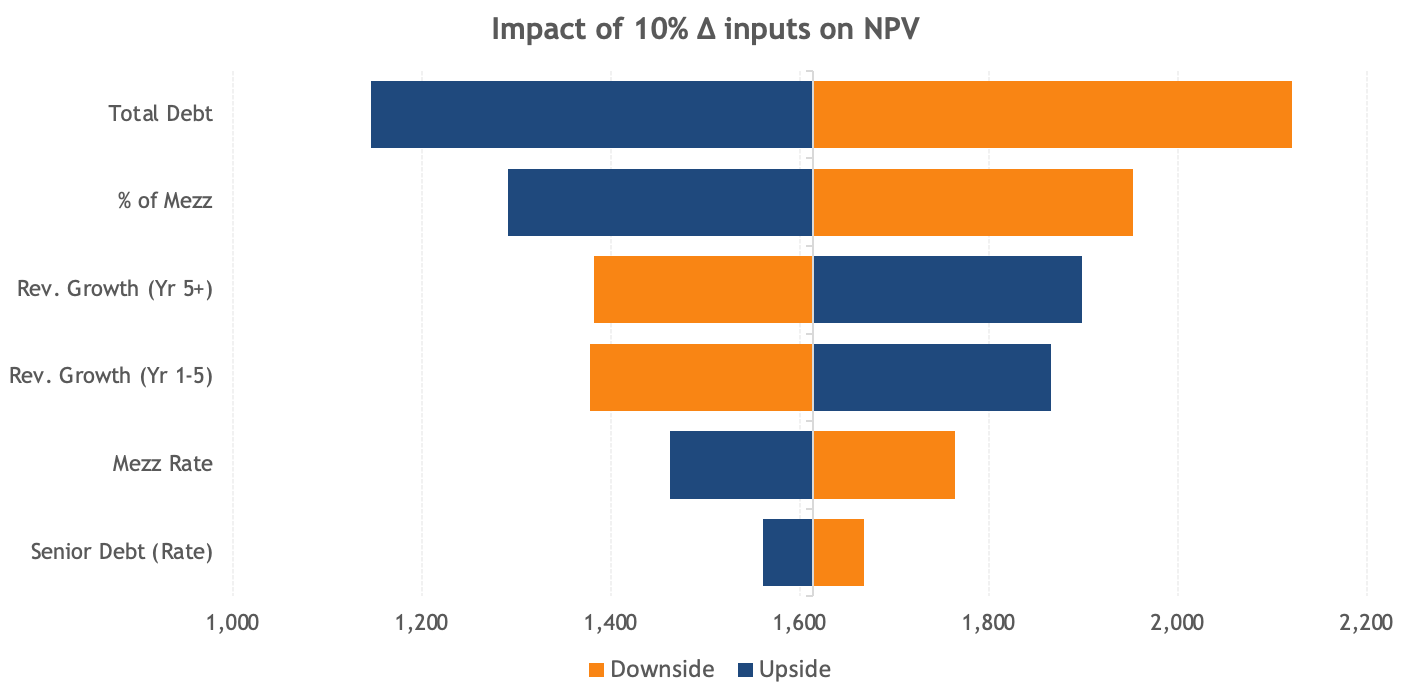
Output
Excel Chart: Output chart of the sensitivity analysis to visualize the changes in input(s) and the corresponding output.
Individual Scenario Outputs: Output charts of the individual scenario analysis for each input variable.
Data: Output data used for the chart(s).
View demo here